From the window at the office I’ve seen a series of futuristic buildings erected, first the Gherkin, then the Shard and now the Walkie Talkie:

The last one being recently been re-dubbed the Walkie Scorchie as it produces a supercharged solar ‘death ray’ that has burned holes in carpets, melted furniture and even the interior of a Jaguar parked nearby.
It feels almost reminiscent of the dystopian future portrayed in the cult film Idiocracy:

Though our current society is probably closer to the surveillance society of 1984 with the omnipresent Big Brother watching over you:

The everyday software we work with is no less broken, or so Scott Hanselman concludes in everything's broken and nobody's upset.
Software is increasingly a world of broken windows where developers are more accustomed to working around issues than giving feedback, let alone tackling the root causes.
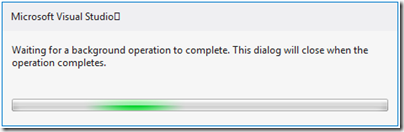
Anyone else struggling with the cognitive dissonance of a modal dialog waiting for a background operation to complete?
XAML
I’ve been using XAML in it’s various guises off an on for over 5 years now. Over that time I’ve used WPF, Silverlight and Metro. It feels like little has changed in that time. It’s still probably the best thing out there for desktop app development but surely we could do better.
XML
I’m still stuck editing views in XML, the poor man’s DSL. I, like the developers I know rarely use the designer view. When we do it frequently hangs and we’re left manually killing XDescProc.exe from task manager.
Data Binding
Data binding is central to XAML. With it you can easily bind a collection to a data grid and get sorting and filtering for free. But binding comes with a high performance cost and it’s stringly typed nature means you’re left finding binding errors in the output window at runtime.
Dynamically binding a view to a model would make more sense to me if I could edit the view at runtime, but you can’t, it’s compiled in.
Value Converters
If I want to transform a model value bound to the view to a different form I have to create a class that implements the IValueConverter interface then reference it as a static resource in the resources section. It has all the elegance of C++ header files. Achieving the same thing in ASP.Net is much simpler, you can just write inline some code in the view or call a function.
INotifyPropertyChanged
There’s a plethora of libraries and frameworks dedicated to working around this design decision, from the MVVM frameworks with LINQ expressions to PostSharp and attributes. The C# 5 compiler’s CallerMemberName attribute has finally brought some sanity to the situation. But I know many developers, including myself, have wasted countless hours dealing with it and trying to think of ways of subverting it.
Just about every view model class ends up inheriting from some ViewModelBase or ObservableObject class so that it can implement INotifyPropertyChanged.
Inheritance
It is often said that object-oriented programming is well suited to graphical user interfaces. Perhaps, but I start to have doubts when I see WPF’s Button class with 9 layers of inheritance and over 160 members.
Visual Studio 2010 introduced improved intellisense with substring search on members to partially work around this, but honestly I’d prefer to see buttons be closer to having content and a clicked event than their current diaspora of responsibilities.
Null Reference Exceptions
By far the most common error I see in C# applications is Null Reference Exceptions. Hardly a day goes by where yet another null check is added to the codebase. This needs to be fixed at the language level, functional-first languages like Scala and F# show it’s possible.
HTML5 & JavaScript
HTML 5 and JavaScript are now being pushed as an alternate environment for desktop development. JavaScript has come a long way performance and libraries wise and I like the HTML 5 Canvas model. However I’m not yet convinced how well this scales to multi-window applications that need to interact between processes.
Windows 8
I get that Metro style interfaces are good for tablets and touch, but for multi-window desktop applications it feels like a non-starter.

I’ve seen traders use 9 displays simultaneously, running a multitude of different apps from execution platforms and news services to Excel, Outlook and instant messengers.
To me Windows 8 appears to be consumer orientated release. I’m hoping the next version will bring something for the larger customer base of business users.
Vendors
One person’s problem is another’s opportunity. Third party vendors like JetBrains are grasping the opportunity with both hands by patching flaws in Visual Studio and C# with tools like Resharper. They’re now starting to provide elastoplasts over XAML editing too. Jetbrains are not the only ones, Telerik and others are making hay selling themes and datagrids.

To temporarily workaround performance issues caused by the cost of the mouse handler events in one these products we were forced to throttle the number of system mouse events bubbling through the system.
Duct tape is a good short term solution, but surely at some point we should consider building a stronger foundation.
Simplicity
I would not give a fig for the simplicity this side of complexity, but I would give my life for the simplicity on the other side of complexity. - Oliver Wendell Holmes, Jr.
XAML is huge and bloated, WPF 4.5 Unleashed is 864 pages long, yet XAML’s focus on data binding makes it feel like a one-trick pony.
I think a modern desktop UI environment needs to cover a diverse range of product scenarios. There should be a low-level core that can be easily accessed with code for high performance features all the way up to a designer view for tacking databases on to views, and it should all interoperate seamlessly.
Sections of the development community are striving to bring simplicity to our environments. Language designers like Rich Hickey (Clojure) and Don Syme (F#) are bringing us simplicity at the language level. I’d love to see these thought processes applied to UI environments too.
To tackle the root causes of problems some times you need to stop continuously patching over the cracks, step back and take time to look at the big picture. To create Clojure Rich Hickey practised Hammock driven development. I’d love to see more of this kind of thoughtful design and less Mortgage driven development.
Tackling the root causes of complexity and defects in our software is not an easy choice, it requires investment and changes to the way we do things. But not changing is a choice too.
They live out their lives in this virtual reality as they would have around the turn of the 20th and 21st centuries. The time period was chosen because it is supposedly the pinnacle of human civilization. – Agent Smith
Must Java like languages and XML be considered the pinnacle of software development for time immemorial?